Why doesn't my website attract customers? 7 common causes — and one nobody talks about
You have had a website for years. You paid to have it built — maybe even for SEO. But the phone stays quiet, emails do not arrive, and customers seem to find your competitors instead. I have been building and fixing websites since 1997. Here is what I actually see when I look under the hood — not a generic checklist, but the real reasons businesses lose enquiries online every day.
- Most sites fail not because of design — but because of speed, clarity, and missing calls to action
- Google Maps visibility matters more than the website itself for many local businesses
- Real SEO results take months — but the first signs appear within weeks
- The 8th reason nobody mentions: your site was built to impress, not to convert
- A free visibility audit is the fastest way to find your specific problem
1. Your site loads too slowly
About 53% of users leave a site that takes longer than three seconds to load. That is not an abstract statistic — that is a potential customer who found a competitor instead of you.
Slowness usually comes from a mix of factors: weak shared hosting, heavy uncompressed images, an outdated WordPress theme with too many plugins, or heavy tracking scripts. When we take over a slow WordPress site, the first step is always the same: measure in PageSpeed Insights, fix the images, check the hosting, remove unused plugins. Often that alone takes a site from a score of 45 to 80+ — without rebuilding anything.
Speed also affects Google ranking directly. Two sites with similar content — the faster one wins.
2. Your site is not built for phones
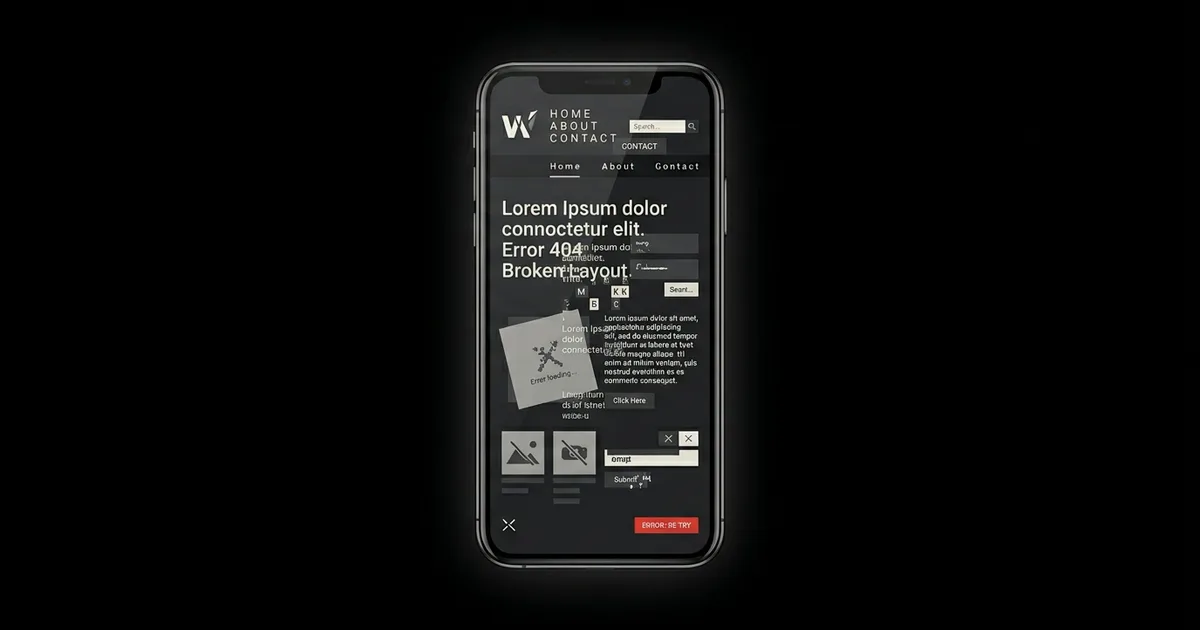
Over 70% of web traffic now comes from phones. In local services — plumbers, installers, workshops — the share is often higher. People search while standing at a job site or sitting in a car.
If your site requires pinching to read text, has buttons that are too small to tap, or a form that breaks on a small screen — users do not struggle. They go back to Google and call your competitor.
Since 2019 Google uses mobile-first indexing — it evaluates your site from the mobile version. A weak mobile site loses both users and ranking. Test: walk through your site on a phone like a real customer. Can you find the phone number in under 10 seconds? Can you submit the contact form? If not — that is your priority.
3. Nobody knows what you actually do
You have three to five seconds to answer three questions: What do you do? For whom? Why you?
If the first screen opens with "Welcome to our company" and a generic building photo, most visitors assume this is not the answer to their problem — and leave.
Compare these two headlines:
- ❌ "Comprehensive solutions for your business needs"
- ✅ "We build e-commerce for furniture manufacturers — with automated quoting"
- ❌ "Quality services since 1985"
- ✅ "BMW service in Warsaw — book online, parts ordered same day"
Specific beats generic. Every time. Try this: ask someone outside your industry to look at your homepage for 5 seconds and say what you do. If they cannot — rewrite the hero.
4. No clear call to action
Many sites look like information catalogues: about us, history, services — but no decision moment. The visitor read something and then… what?
Good CTAs are specific: not "Contact", but "Book a free consultation", "Request a quote within 24h", "Call to book a visit". They should stand out visually and repeat in natural places — after a service description, after a case study, at the end of the page.
Practical rule: on every important service page, include at least one visible button to contact or request a quote — and make it say what happens next, not just "Submit".
5. Your site is not visible in Google
You can have great design and decent copy — if nobody finds you from search, the business impact is zero. But SEO is not "sprinkling keywords". It is speed, structure, content, internal linking, structured data, and local presence.
Here is a real example. Verktygsgrossen.nu — a Swedish tools retailer — was spending heavily on Google Ads. The owner decided to stop paid advertising and invest in organic optimisation instead. The results from Google Search Console:
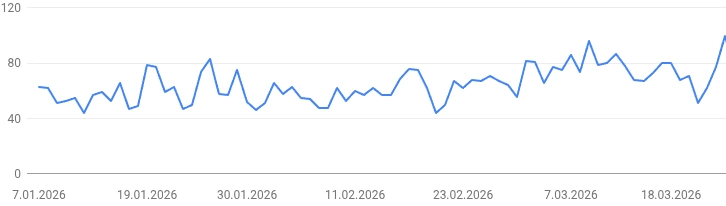
No overnight miracle — organic SEO never is. But within weeks the trend turned upward, and it keeps climbing. The key changes: fixed technical issues that were blocking indexing, rewrote product category pages around real search queries, improved internal linking. Nothing exotic — just the fundamentals done properly.
A second example: HQ Lights (hqlights.com) — a webshop for automotive lighting. No paid advertising. Growth driven entirely by organic search and SEO work:
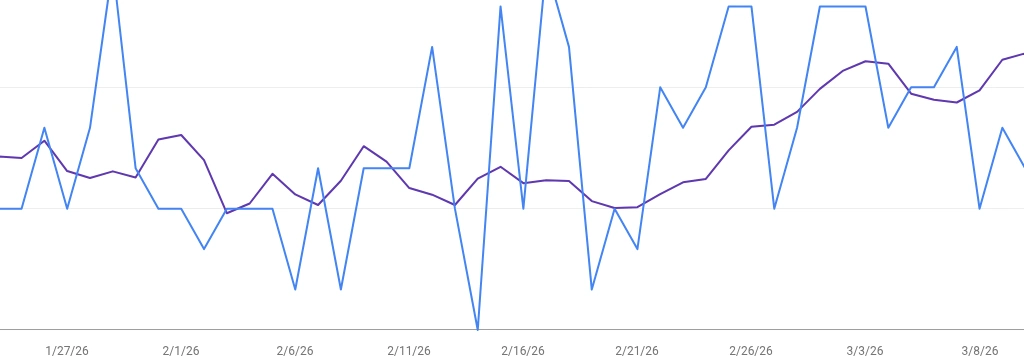
What most companies miss: real SEO requires both technical foundations AND genuine content — and neither alone is enough. We have taken over from agencies that delivered monthly reports full of keyword rankings — but nobody had fixed the indexing error blocking 60% of the site's pages from Google. We have also seen the opposite: technically clean sites filled with AI-generated blog posts that brought traffic but zero enquiries. That approach worked for a while, a few years ago. Today Google and AI search tools are significantly better at recognising thin, generic content — and they ignore it. What actually works in 2026 is specific, first-hand content that answers real customer questions — combined with solid technical structure. One without the other delivers half the result at best.
First step: open Google Search Console and check the Coverage report. Are your pages actually indexed? Which queries do you show for — and do they have purchase intent? Start there before any content work.
6. Your content is outdated or generic
"We offer the highest quality at competitive prices." This line appears on hundreds of thousands of websites. The brain filters it out instantly.
Customers want specifics: what you do, how the process works, how long it takes, typical outcomes. The more real detail, the more trust — the more it sounds like a company that actually does the work.
Outdated content is worse: old price lists, outdated policies, promotions that ended three years ago. It signals that "nobody maintains this" — and raises the question of whether customer support is similarly slow.
Action: pick your five most important pages and rewrite them around real customer questions. Add your actual process, real timelines, and at least one specific outcome or example. That beats another visual refresh.
7. Missing reviews and social proof
Before calling, most people look for proof: Google reviews, case studies, client logos, concrete numbers. That beats superlatives in the headline because it is harder to fake.
No reviews does not mean a bad company — but online it reads as risk. If you have happy customers, make it easy to leave reviews and ask ethically. Replying to reviews — including critical ones — shows the business is alive and accountable. A professional reply to a negative comment often builds more trust than a perfect five-star average.
If you cannot name clients (NDA), prove value differently: describe the process, show scope of work, use metrics without names. See how we handle it in our portfolio →
8. Your site was built to impress — not to convert
This is the one nobody talks about — because it is uncomfortable.
Most websites are signed off in a meeting room by people who will never use them the way customers do. The decision-maker approves the design because it "looks professional" or "represents the brand well". The customer does not care about the brand. The customer has a problem and wants to know if you can solve it — fast.
Signs your site was built to impress rather than convert:
- The hero image is beautiful but has no headline that explains what you do
- The "About us" page is longer than the "Services" page
- The contact form asks for 12 fields before offering anything in return
- The site looks great on a 27-inch monitor and terrible on a phone
- The only CTA is "Submit" on a hidden contact page
The fix is not always a full rebuild. Sometimes rewriting the hero, adding one clear CTA, and fixing the mobile layout is enough to double enquiry rates. But it requires being honest about who the site was built for.
Quick self-audit: 10 questions to ask right now
You do not need technical knowledge for this. Open your site on a phone and go through these:
- Does the first screen clearly say what you do and for whom?
- Can you find a phone number in under 10 seconds?
- Is there a visible button to contact or request a quote above the fold?
- Does the site load in under 3 seconds (test in PageSpeed Insights)?
- Can you complete the contact form on a phone without zooming or horizontal scrolling?
- Are there at least 5 Google reviews visible on or linked from your site?
- Does your Google Maps listing exist and show correct hours and services?
- When you Google your main service + city, do you appear on the first page?
- Is the content on your main service pages specific to your process — or could it describe any company in your industry?
- When did you last update the content on your most important page?
If you answered "no" or "I am not sure" to three or more — you have found your starting point. Most of these are fixable without a full rebuild.
What to do next
You do not always need a full rebuild. Often the right first step is to find out which of these issues hurts you most — and in what order to fix them.
The fastest way to find out is a visibility and conversion audit: an objective look at your site, Google Business Profile, search rankings, and competitor presence. You get a concrete list of issues and priorities — not a generic sales pitch.
At 01 Media we offer this free. We have been doing this since 1997 — across manufacturing, retail, B2B services, and e-commerce. We know what to look for and how to explain it in plain language.
How we build websites → · How we approach SEO →
Want to know what is wrong on your site?
We run a free visibility review — we check your site, Google ranking, Maps listing, and competitors. You get a concrete report within 24 hours.
GET A FREE REVIEWMore guides
What is GEO and why your business should care
ChatGPT, Gemini, Perplexity — more people get answers from AI instead of clicking results. Here is what that means for your business.
Read article →Google Business Profile — complete guide for small business
Your Google Maps listing is often the first thing a customer sees. Here is how to set it up correctly.
Read article →